WARNINGDust and Dirt will KILL a computer!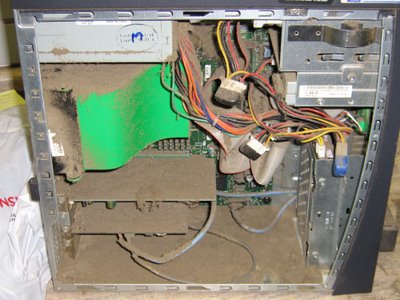
Electronics build up heat. It's a fact that can not be denied. As computers become faster they also run hotter. Most computers have fans built into the case to take cool air in and disperse warm air outwards. The problem is that cool air is not the only thing taken in by these fans. Dust, dirt and lint are all "sucked" in by these fans. As time goes on these substances form a coating on the electronic components inside the computer. This begins to act as insulation and prevents proper cooling. Heat builds until it reaches the point of causing critical failure of various components such as processor and motherboard. Some people are comfortable cleaning their computers themselves with canned air sold at many department stores. Please remember 2 things if you choose to do this. 1) DO NOT TOUCH ANYTHING INSIDE THE COMPUTER - Static electricity can also KILL electronics. We recommend wearing a grounding strap at all times or at minimum always touching the metal case with one hand. DO NOT ASSUME that because you have done this without grounding in the past that no harm came to the PC. The static charge needed to damage a component is so small that you would not even feel a "shock". Also remember that a damaged part does not always go bad immediately. Sometimes it could take days or even months for the damage to show up. 2) CLEAN THE POWER SUPPLY - Many people forget the PSU in their computer usually has one or two built in fans. PSU's can be filled with dust but overlooked simply because it appears to be a sealed unit . Air can be directed into the PSU by the front , back , and sometimes top or bottom. NEVER open the PSU. Power Supply's can hold voltage for YEARS even if unplugged. In most cases this voltage is enough to KILL YOU! 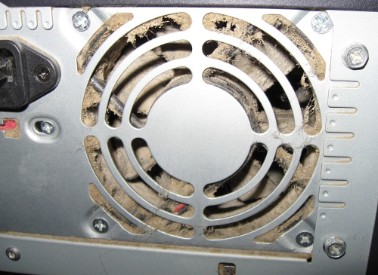 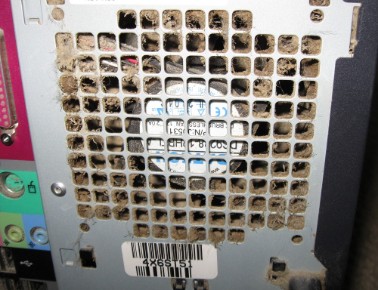 |
WATCH OUT FOR ROGUES! 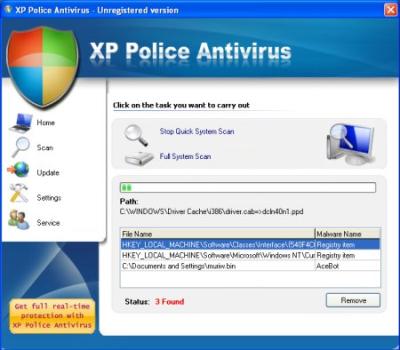 The picture above is whats called a ROGUE ANTIVIRUS. This is a program that is created to appear to be a legit virus scanner. It installs itself on your computer by attaching itself to a download , email or simply by taking advantage of known security flaws in Windows. Once installed on your system it "Scans" and informs the user of "infection". Please note: There are NO INFECTIONS . The program simply wants you to pay money in order to deactivate it. THESE PROGRAMS OFFER NO REAL PROTECTION! Even if you pay they will most likely return as another "scanner". While some people chose to remove these pests themselves we advise against doing so. Many times system registry vales are charged by these pests and must be repaired for the computer to work at 100%. You must also remember that a possible security flaw exists that allowed this program into your computer in the first place. Simply removing it DOES NOT fix the security flaw! If you choose to remove the rogue we recommend having a professional run a full registry scan and security diagnostic on the computer afterwards. Many shops (such as our own) offer security scans at a reduced price of a full virus scan. REMEMBER These pests come in MANY varieties! A few are shown below: 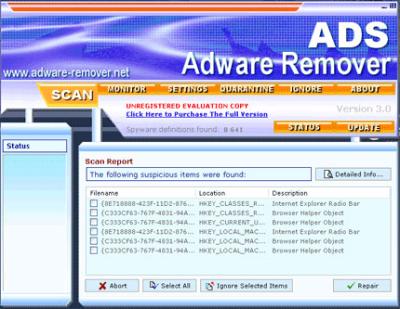 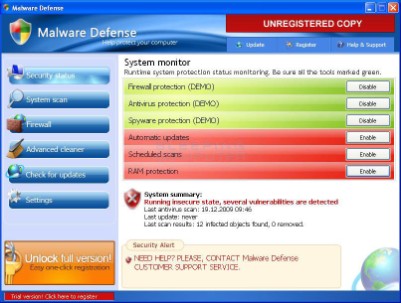 |
WHY UPGRADE RAM? .jpg) Many people who visit us ask what's the difference between memory (RAM) and Storage (Hard Drive). They assume because they have a 1 TB hard drive that they do not need RAM . Here's two way's to think of the two. METHOD ONE : CANS OF SODA Picture this, you are in charge of supplying soda at a party for wealthy people. Back at your house you have a HUGE refrigerator that holds 100,000,000 cans of soda! The problem is , this party is 50 miles away! That's a LONG run every-time someone wants a soda! So you fix this issue by getting a cooler . Now you can keep this cooler in the trunk of your car and when someone needs a soda you simply run outside and get it ! The problem however is if the cooler only holds 512 cans. What is the chance your have the exact flavor the customer wants? If you do not have it, you need to run all the way home. Your answer.. GET A BIGGER COOLER! To break this down: SODA - File of information/ program Wealthy people- COMPUTER USER YOU - System CPU REFRIGERATOR AT HOME- HARD DRIVE COOLER- System RAM ANOTHER METHOD: WORK-SPACE Lets say you work in an office with a lot of clients. You keep all of their documents in a huge file cabinet. When you want to work with those documents you need to take them out of the file cabinet and put them somewhere! That's what you have a desk for! The problem is if you have a very small desk you can't work with many files at once. Your answer is to get a BIGGER DESK. Break down Documents - File of information/ program File Cabinet - Hard Drive YOU- System CPU Desk - System RAM Hopefully this will help EVERYONE ! |
